
Daily food log: meals, protein, water, notes
A daily food log is a record of what you ate and drank. This one has room for meals, protein, water, and notes, and every line starts blank. Cafeity can keep the same kind of record on an iPhone. The sheet does not set a protein goal or a water goal. Ask your doctor or a registered dietitian if you want a target for you.
Disclosure: Cafeity is made by the author.
Download US Letter PDF (107 KB) Download A4 PDF (107 KB)
Free, with no email needed. One day on one page, black on white.
What this log is for
It is a record of one day: what you ate, roughly how much, the protein if you know it, what you drank, and anything you want to note. It is not a meal plan, not a score and not a clinic form. Nothing on it tells you what the day should have been, and the footer on the printed sheet says the same.
What Cafeity already records
If you'd rather keep the record on your phone, food logging in Cafeity covers the same ground:
- Four ways to log a meal: a photo of the plate, analysed by AI; a search of a database built on USDA FoodData Central and Open Food Facts; a barcode scan; or quick-add of just protein or just calories.
- What it counts: calories, protein, carbohydrate, fat and fibre, from what you enter, leading with protein, fibre and water. The app stores calories, carbohydrate and fat too; they are not columns on the paper.
- Photo logging is an estimate. You can correct foods and portions before saving.
- Water is logged with a tap and shown on the Today screen, with an optional water reminder; see how Cafeity logs water.
- Apple Health: if you connect it, Cafeity writes the values you enter. AI-estimated values are never written to Health.
The app keeps what you enter; it does not grade the day. See the food tracker and the protein tracker for how the record looks. Cafeity is on the App Store for iPhone. There is no Android version yet. More in the Cafeity FAQs.
How to fill the paper
- Food and amount: what you actually had, in whatever words make sense to you, and the amount you ate, not the amount on the plate.
- Protein (g): if you know it from a label or a list, write it. If you don't, leave it blank. The protein food list can help.
- Fibre (g): optional. Fill it in only if you want to.
- Water: the time, what you drank, the amount and the unit, in cups, fluid ounces or milliliters. The total is optional.
- Notes: anything at all, including "not hungry". The sheet doesn't interpret notes.
The printable log
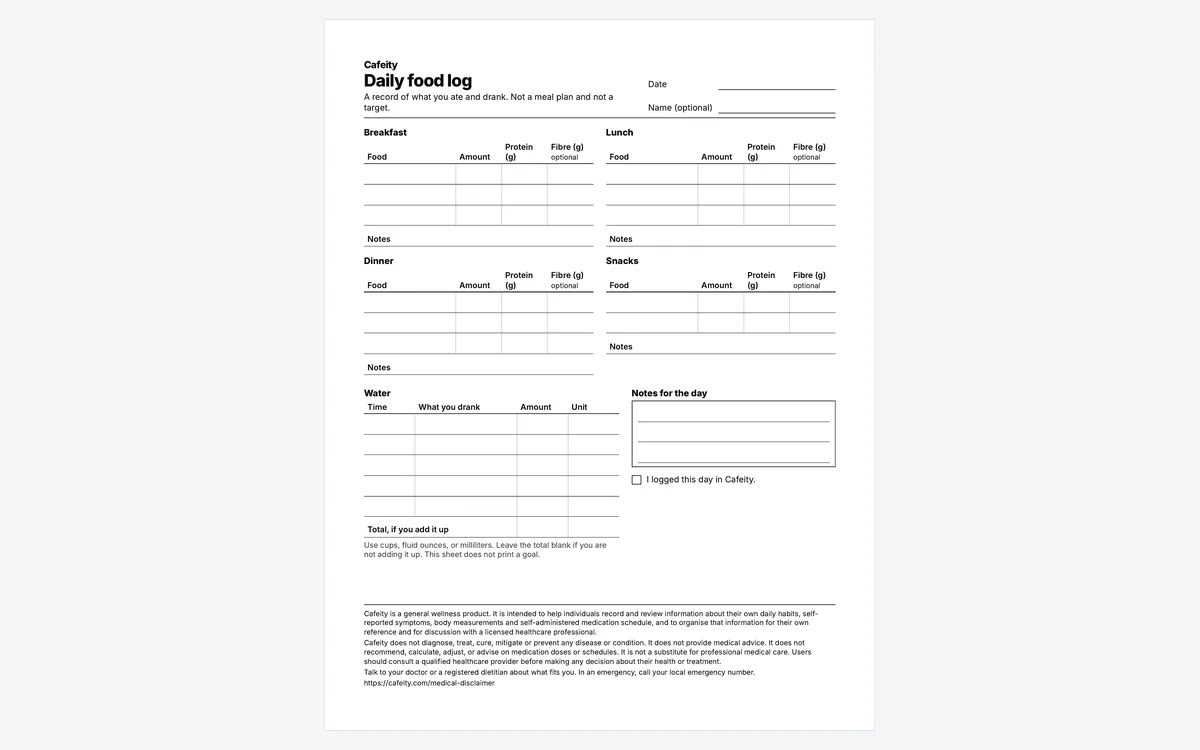
The same fields in three views: the sheet below, a US Letter PDF (8.5 × 11 in) and an A4 PDF (210 × 297 mm). Each is one day on one page, with labels in a plain typeface and writing rows tall enough to write in.
Cafeity
Daily food log
A record of what you ate and drank. Not a meal plan and not a target.
Date
Name (optional)
Breakfast
| Food | Amount | Protein (g) | Fibre (g) optional |
|---|---|---|---|
Notes
Lunch
| Food | Amount | Protein (g) | Fibre (g) optional |
|---|---|---|---|
Notes
Dinner
| Food | Amount | Protein (g) | Fibre (g) optional |
|---|---|---|---|
Notes
Snacks
| Food | Amount | Protein (g) | Fibre (g) optional |
|---|---|---|---|
Notes
Water
| Time | What you drank | Amount | Unit |
|---|---|---|---|
| Total, if you add it up | |||
Use cups, fluid ounces, or milliliters. Leave the total blank if you are not adding it up. This sheet does not print a goal.
Notes for the day
I logged this day in Cafeity.
The printed footer carries the intended-use text below and a link to the medical disclaimer.
What the sheet leaves off
There is no dose column and no symptom scale. Symptom notes go on the side-effect diary, and questions about a dose go to your prescriber; see questions to ask your doctor. There are no calorie, carbohydrate, fat, weight or goal columns, and this sheet sets no target. For weight, there is a separate weight log. For what to eat, read what to eat on a GLP-1.
Common questions
What should a daily food log include?
This one includes the meal, the amount, protein if you know it, optional fibre, what you drank, and notes. The lines start blank. It is a record, not a plan. There is a table for each meal, a water table with the time, the drink, the amount and the unit, and a box for notes on the day.
Does this food log set a protein or water goal?
No. Leave a number blank if you do not know it. If you want a target, ask your doctor or a registered dietitian. Cafeity keeps what you enter. This sheet does not tell you what the day should have been.
Can I use this instead of the app?
Yes, as a paper record for one day. Cafeity on iPhone can log the same kind of meal by photo, search, barcode, or a quick protein or calorie entry, and it can log water. The paper does not send itself to the app.
Where do I write symptoms or a dose?
Not on this sheet. A symptom note belongs on the side-effect diary. Questions about a dose belong with your prescriber. In an emergency, call your local emergency number. The food log has no dose column and no symptom scale, so the paper stays a record of what you ate and drank.
Is the fibre column required?
No. It is optional, because some people want it and some do not. Protein, water, and notes are the fields this template is built around. Still leave them blank when you have nothing to write. The fibre column header says optional on both the US Letter and the A4 versions.
Sources
- Food logging in Cafeity: the four ways to log, what the app counts, photo estimates and Apple Health (checked 24 Oct 2026).
- How Cafeity logs water: water on Today and the optional reminder.
- USDA FoodData Central and Open Food Facts: the databases the app's food search is built on.
How these pages are researched and corrected: editorial policy.
Related pages
Keep the same record on your phone
Log a meal by photo, search, barcode or a quick number. The app keeps what you enter.