
Why protein leads
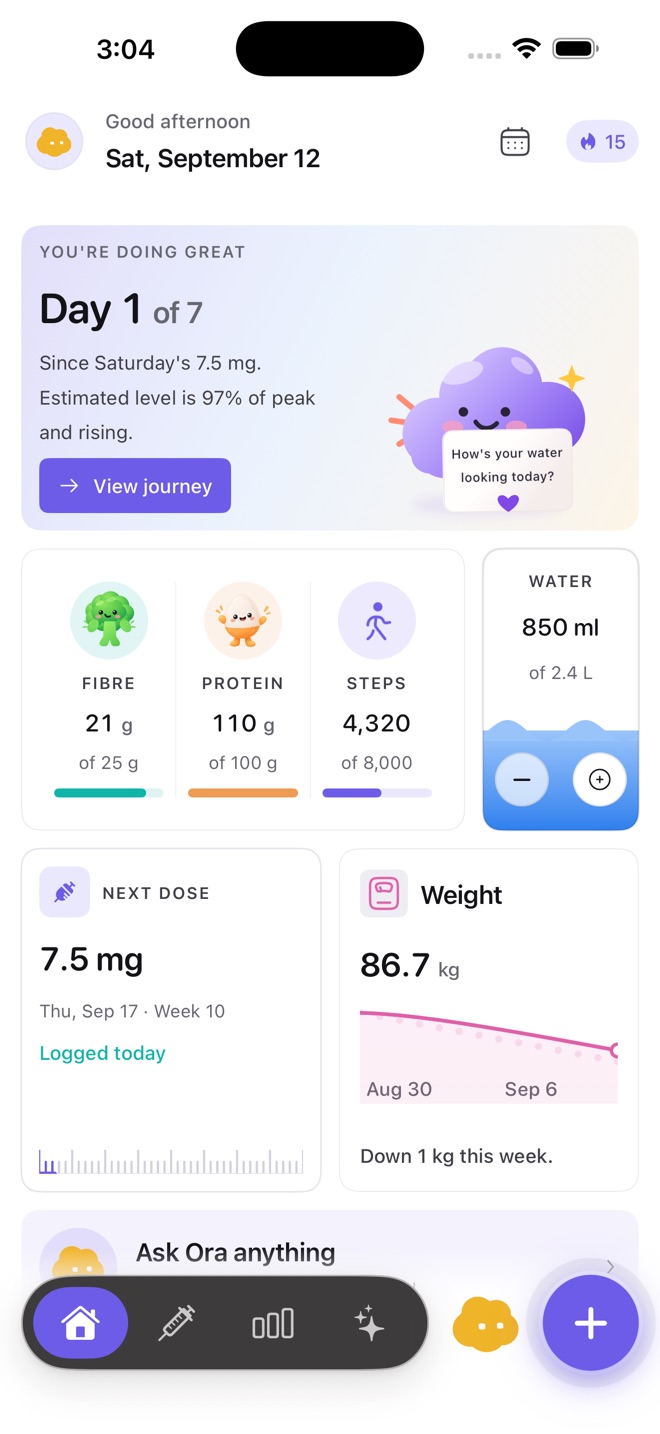
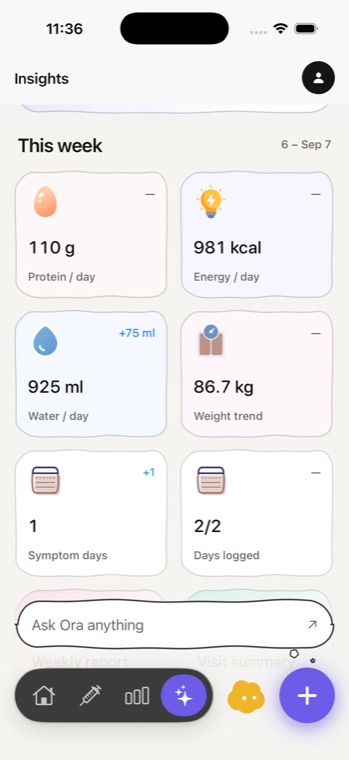
Lean mass is the thing most people on a GLP-1 say they want to protect, and protein is the figure most often raised at an appointment. Cafeity derives a daily figure from body weight — the same 1.4 g/kg you can run yourself on the protein calculator — and shows how close a day came.
It shows the gap. It does not issue instructions, and it does not treat a shortfall as a failure. The point of a derived figure is to give you something concrete to discuss, not a target to be judged against by software.
Fibre and hydration are on the same screen
Both are easy to lose track of when portions shrink, and both are the sort of thing a record makes obvious in a way that memory does not. Cafeity derives figures for these too — 25 g of fibre, and roughly 33 ml of water per kilogram of body weight — and the arithmetic is published rather than hidden.
Every one of those derivations has its own calculator on this site, so you can check what the app is doing before you trust it.
Logging that survives a bad day
An offline food database means logging works on a train, in a waiting room, or with no signal. Gentle mode strips the form down for days when a full entry is not going to happen.
A food log that only works when you are well and connected is a food log with a hole in it exactly where the interesting data would have been.
No calorie floor below 1,200 kcal
This is a hard limit. Cafeity will not set, suggest or accept a target below it, whatever a goal implies.
Appetite suppression makes very low intake easy to reach accidentally, which is precisely why the limit exists. If your circumstances call for something different, that is a conversation with a clinician or a registered dietitian, and the app will not pretend to have an opinion.
What the record holds
Every entry below sits on one timeline, so any of them can be read against where you were in the medication cycle when it happened.
- Doses — date, time, the amount you were prescribed, and the medication as a plain label.
- Injection site, on a body map, so rotation is visible rather than remembered.
- Meals, with protein, fibre and hydration derived from what you logged.
- Symptoms, in your words, with your own severity rating.
- Weight and measurements, shown as a trend rather than a daily verdict.
Inside the app
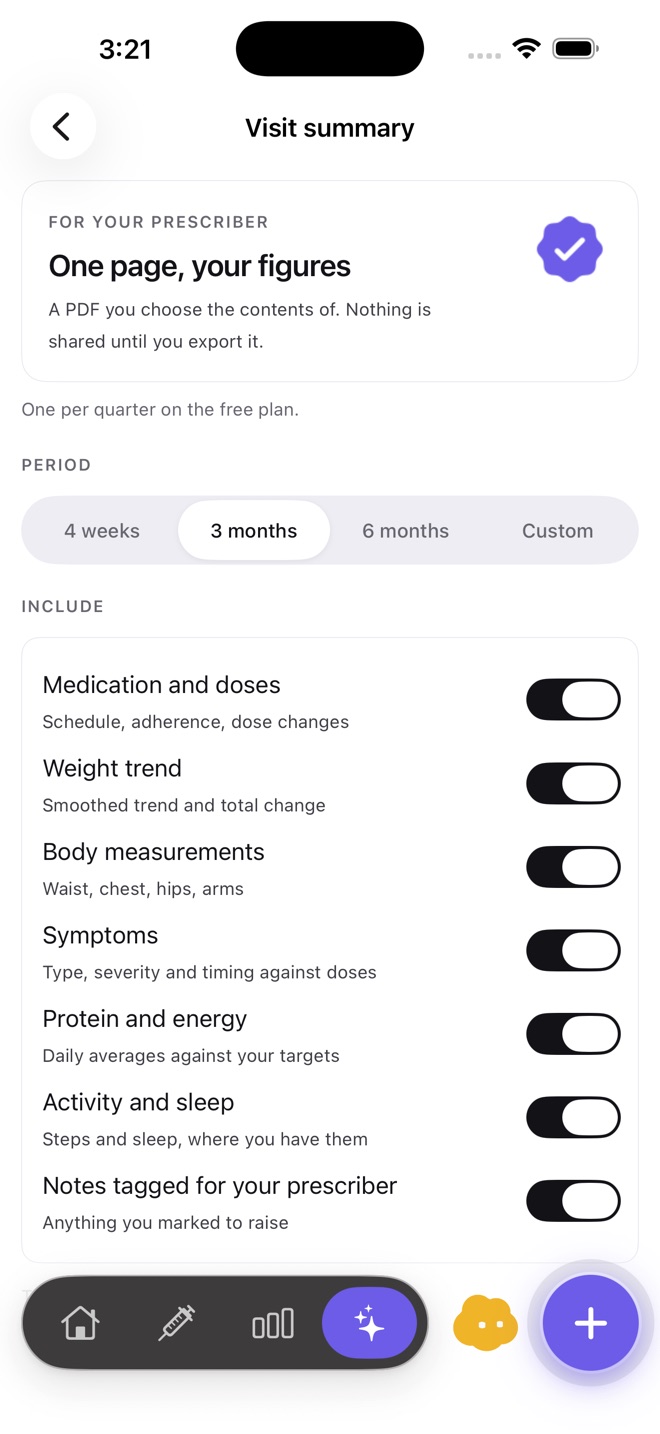
Screenshots from Cafeity on iPhone. The app is on the App Store; screens change as it is updated.
Across every medication
This works the same way whichever medication you are on — the only thing that changes is the half-life behind the curve.
- Semaglutide — once weekly, published half-life about 7 days (roughly 165 hours).
- Tirzepatide — once weekly, published half-life about 5 days (roughly 117 hours).
- Liraglutide — once daily, published half-life about 13 hours.
- Dulaglutide — once weekly, published half-life about 4.7 days (roughly 112 hours).
- Exenatide — twice daily, or weekly in the extended-release form, published half-life about 2.4 hours for the immediate-release form.
Where your data lives
On your device and in your own account, under per-record permissions. Health data is never stored in iCloud, never sold, never used for advertising, and never used as training data.
You can export everything in one file at any time, and you can delete the record entirely. When you want to bring something to an appointment, the Visit Summary builds a one-page, print-ready PDF from a period and the sections you choose — and nothing leaves the phone until you do that yourself.
What Cafeity will never do
- Recommend, calculate or adjust a dose, or tell you when to take one.
- Interpret a symptom, name a condition, or suggest what is causing something.
- Predict how much weight you will lose, or when.
- Set a calorie target below 1,200 kcal, or a weight goal below a BMI of 18.5.
Cafeity is a general wellness product. It does not diagnose, treat, cure, mitigate or prevent any disease or condition. Questions about your treatment belong with a licensed healthcare professional.
Common questions
How is my protein figure worked out?
Does it count calories?
Can it tell me what to eat?
Does food logging work offline?
Further reading
Cafeity is a record-keeping tool, not a drug reference. Anything clinical — what a medication is approved for, who should not take it, what to watch for, how it interacts with other medicines — belongs with the sources below and with your own prescriber.
- Medicines A to Z NHS
- Drugs, Herbs and Supplements MedlinePlus, US National Library of Medicine
- DailyMed — FDA prescribing information US National Library of Medicine
External links open in a new tab. Cafeity is not affiliated with any of these organisations.