Cafeity Get the app

Feature

The Visit Summary

Most prescribers get ten minutes. The Visit Summary is built for those ten minutes: one page, print-ready, built from a period you choose and only the sections you tick — so the conversation starts from what actually happened rather than from what you can remember in the waiting room.

The short answer

The Visit Summary is a one-page PDF that Cafeity builds from your own record for a period you choose — four weeks, three months, six months or custom. You tick which sections to include: medication and doses (schedule, adherence and dose changes), weight trend, body measurements, symptoms (type, severity and timing against doses), protein and energy, activity and sleep, and notes you have tagged for your prescriber. Nothing is shared until you export it. The free plan includes one Visit Summary a quarter; Cafeity Pro makes it unlimited.

Cafeity Visit Summary set-up: "For your prescriber — one page, your figures. A PDF you choose the contents of. Nothing is shared until you export it", with period options and switches for medication and doses, weight trend, body measurements, symptoms, protein and energy, activity and sleep, and notes tagged for the prescriber.
Choose the period and the sections. The PDF is built on the phone and shared only when you choose to.

What goes on the page

Each section is optional; the Visit Summary only includes what you switch on.
SectionWhat it shows
Medication and dosesSchedule, adherence and dose changes across the period
Weight trendThe smoothed trend and the total change
Body measurementsWaist, chest, hips and arms, if you record them
SymptomsType, severity and timing against your doses
Protein and energyDaily averages against your targets
Activity and sleepSteps and sleep, where you have them
Notes for your prescriberAnything you tagged to raise at the appointment

Why one page

A prescriber can act on a pattern, not a diary. "Nausea on and off" is hard to do anything with; a page showing nausea at 3 out of 5 on the two days after each injection, getting worse since the last dose increase, is not. The same goes for weight: a smoothed trend with dose changes marked says more than any single reading.

The questions in questions to ask your doctor are easier to answer with the page in front of you both.

What it is not

The Visit Summary describes your record; it does not interpret it. It does not grade adherence, label a symptom, suggest a dose or predict anything. The estimated medication level is not included as a measurement, because it is not one. And it is your document: it is built on the phone, and it goes nowhere until you share it.

The paper version

If you are not using the app, the free printable weekly tracker, side-effect diary and appointment checklist cover the same ground on paper.

What it will never do

  • Recommend, calculate or adjust a dose, or tell you when to take one.
  • Interpret a symptom, name a condition, or suggest what is causing something.
  • Predict how much weight you will lose, or when.
  • Set a calorie target below 1,200 kcal, or a weight goal below a BMI of 18.5.

Cafeity is a general wellness product. It does not diagnose, treat, cure, mitigate or prevent any disease or condition. Questions about your treatment belong with a licensed healthcare professional.

Keeping a record of it

Screens from Cafeity on iPhone.
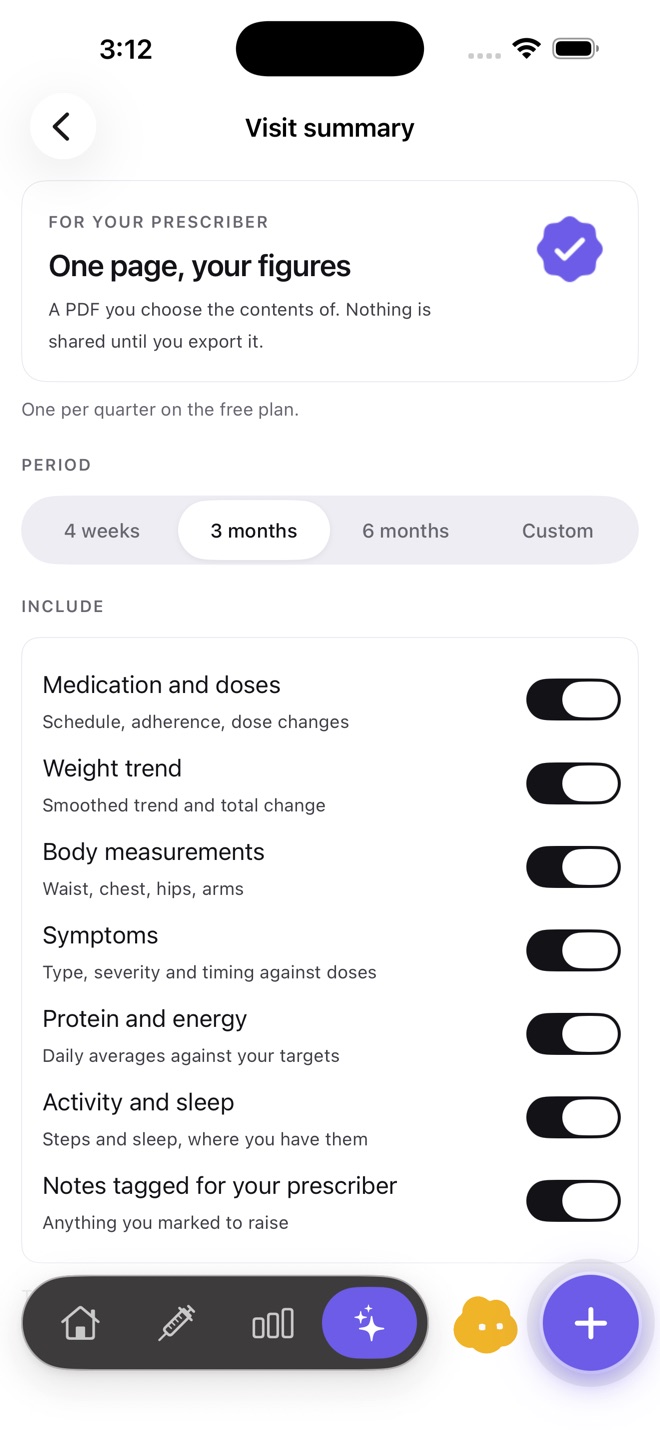
Cafeity Visit Summary set-up: a period picker (4 weeks, 3 months, 6 months, custom) and switches for medication and doses, weight trend, body measurements, symptoms, protein and energy, activity and sleep, and notes tagged for the prescriber.
Period and sections.
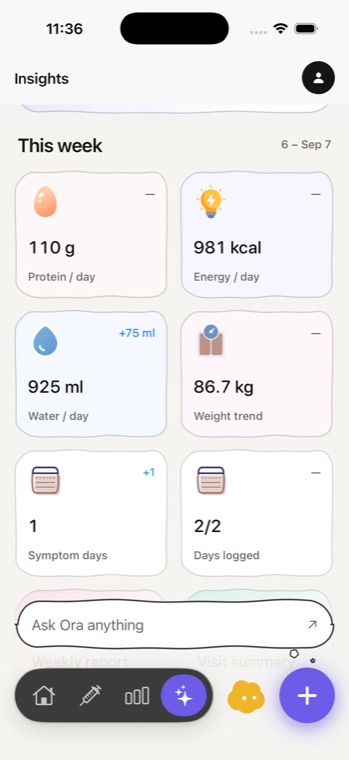
Cafeity weekly summary: protein 110 g a day, energy 981 kcal a day, water 925 ml a day, weight trend 86.7 kg, one symptom day and two of two days logged.
The week the summary draws on.

Download Cafeity on the App Store

Common questions

Is the Visit Summary free?
The free plan includes one Visit Summary a quarter. Cafeity Pro makes them unlimited.
Who can see my Visit Summary?
Only whoever you give it to. It is built on your phone and shared only when you export it yourself.
Can my doctor log in to see my data?
No. There is no clinician portal; the Visit Summary is a document you choose to hand over.